Student Tech Product Guide

8 Best Mechanical Keyboard for Students 2026: Picks That Last

Which mechanical keyboards survive a full semester of essays and exams — with hot-swap upgrades and quiet switches for shared dorms.

8 Best Mechanical Keyboard for Students 2026: Picks That Last editorial illustration

A mechanical keyboard feels like a smart purchase until the first key stops working during finals week — or you discover the 'full RGB' in the listing is actually a fixed rainbow pattern. In a dorm, a clicky switch can also make you the roommate everyone resents.

The keyboards that hold up best for students share two things: hot-swappable sockets that let you swap a worn switch instead of replacing the whole board, and a switch type that stays quiet in shared spaces. Portability matters too — moving between dorm and library shouldn't mean a cable tangle.

The $40-70 band is where budget boards actually earn their keep, with gasket mounts, double-shot keycaps, and smoother switches. Below that, you're betting on whether the board will still work next semester — and the odds aren't in your favor.

#1

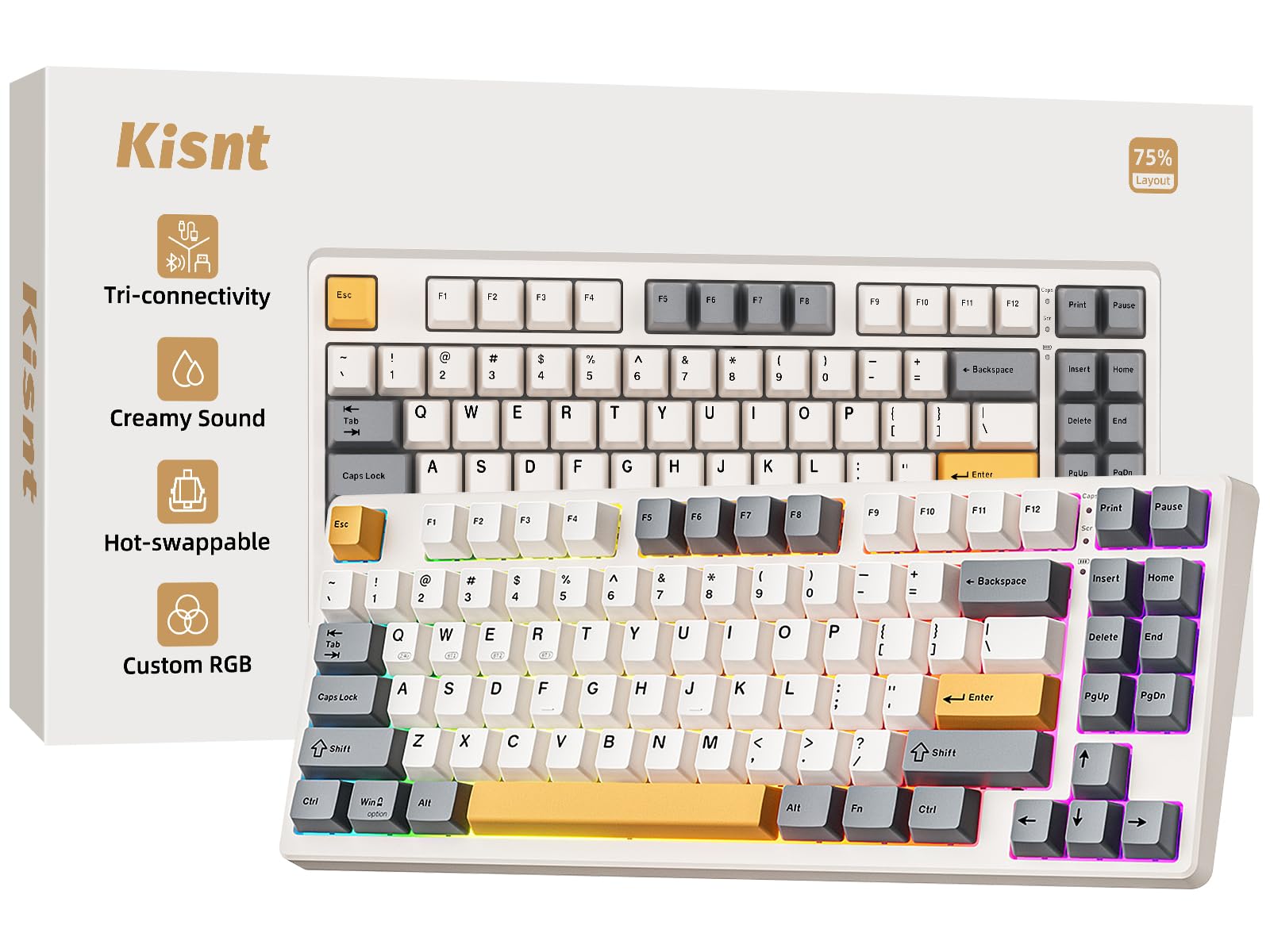
Kisnt KN85

Kisnt KN85

Wireless campus typing

Customer rating 4.6/5
Check Price

Worth Noting

  • Companion app limits RGB and macro customization to its 20 preset effects, which cover standard use
  • In a lecture hall, Bluetooth can drop mid-session
Layout
75% compact
Backlight
20 RGB effects
Switch Type
Pre-lubed linear
Connectivity
Bluetooth, 2.4GHz, USB-C
Read the full review

Tri-mode wireless — Bluetooth 5.0, a 2.4GHz dongle, and USB-C — pairs with a gasket-mounted, pre-lubed Bsun linear build that delivers the creamy, cushioned typing feel that defines this board. The 75% shell packs 85 keys into a compact frame while keeping arrow keys and the navigation cluster, and hot-swappable sockets let you replace worn or noisy switches directly, no soldering iron required.

Five layers of dampening sit inside the gasket mount, absorbing bottom-out so each landing feels soft and thocky rather than sharp and clacky. The switches arrive pre-lubed from the factory, so there is no break-in wobble on day one, and the same responsiveness tracks quick key presses cleanly for light gaming — no mushiness under rapid input. The dampening also softens the sound envelope enough for shared study spaces, short of a dedicated silent board.

Twenty RGB preset effects cover the lighting curve without demanding hours in companion software, and at a mid-range price the tri-mode wireless, gasket mount, and hot-swap socketing carry a feature set that costs more from bigger-name brands. For a student budget, the cost-per-feature math leans clearly favorable, which is why value reads as a standout rather than a footnote.

The clearest fit is a student who shuttles a keyboard between dorm, library, and lecture halls: the compact frame slips into a bag, and the creamy linears keep coursework comfortable through long writing sessions. Two bounds come with that fit. The companion software is bare-bones, so RGB and macro customization stop at the 20 presets, and Bluetooth can drop mid-session — the 2.4GHz dongle and USB-C connection hold steady.

Skip it when a dedicated number pad is non-negotiable for data-heavy coursework — the 85-key layout removes it entirely. For plain typing and light gaming over extended wired sessions, the connection stays stable and the creamy feel holds up across hours of use, which keeps it a strong daily driver for the right buyer.

Bottom line: For students who carry a board between dorm, library, and lecture halls, this blends creamy feel, tri-mode portability, and value better than anything else in this set.

#2

HUO JI E-Yooso

HUO JI E-Yooso

Creamy budget typing

Customer rating 4.6/5
Check Price

Worth Noting

  • Wired-only connection
Layout
96% compact
Backlight
15 RGB effects
Switch Type
Pre-lubed linear
Connectivity
Wired USB-C
Read the full review

Gasket-mounted over five layers of foam with pre-lubed linear switches, the HUO JI E-Yooso delivers the same creamy, thocky typing feel as the wireless top pick for less money. The keys are smooth and soft under the fingers, and the sound is genuinely satisfying rather than hollow. The 99-key, 96% layout keeps a full numpad inside a compact shell, and hot-swappable sockets let you change switches later without soldering — a practical upgrade path the budget field rarely offers.

This board suits the typing-focused student who spends hours on essays and wants rich, creamy feedback without a big budget. The one tradeoff is quality-control variance — in some cases a keycap can arrive cracked or a switch sticky — so a quick arrival check is worthwhile before heavy use. For that same buyer the smooth feel, compact footprint, and genuine numpad easily carry the experience.

The pre-lubed linear profile keeps noise moderate in shared study spaces, and the 15 RGB effects with eight solid colors give a desk enough variety without a gamer aesthetic. Buyers who stay put with a cable get the creamy top-pick experience at a mid-range price — the entire point of choosing this board over the wireless leader.

Bottom line: The right buy for the student who will keep a keyboard plugged to a desk and wants the top pick's creamy feel for less money. If portability matters, the wireless leader is the better fit.

#3

Redragon K668

Redragon K668

Budget full-size custom

Customer rating 4.5/5
Check Price

Worth Noting

  • In hand, the plastic shell feels less premium than machined metal cases on pricier boards in this set.
Layout
Full-size 108-key
Backlight
19 RGB modes
Switch Type
Red linear
Connectivity
Wired USB
Read the full review

The K668 ships as a full customization kit — hot-swappable 3/5-pin sockets, two keycap sets, and spare linear switches — all at a budget price. The 108-key layout plus four dedicated hotkeys covers data-heavy coursework without giving up the numpad. Stock linear switches deliver a satisfying sound and feel that reviewers praise, quiet enough for shared dorm spaces.

Students who want a first keyboard they can grow into — swapping in tactile or clicky switches as preferences evolve — will find the K668's hot-swap design a rare upgradeable pick at this price. The main compromise: the plastic housing can feel less premium than the machined metal cases on pricier boards in this set, a tradeoff that recedes against the low price and bundled extras.

The companion software handles macros, per-key RGB, and remapping without the bare-bones feel of some rivals. Nineteen backlight modes plus music sync keep the RGB crowd covered, while the linear switch option keeps clatter down for anyone wanting mechanical feel without disturbing a roommate.

Bottom line: For budget students who want a full-size RGB board they can upgrade as tastes grow, the K668 delivers more customization per dollar than the wired-only silent options here.

#4

RK R98 Pro

RK R98 Pro

Premium numpad typing

Customer rating 4.6/5
Check Price

Worth Noting

  • In a silent dorm room, the stock switches may sound less creamy than the marketing suggests
Layout
96% with numpad
Backlight
RGB backlit
Switch Type
Pre-lubed cream linear
Connectivity
Wired USB
Read the full review

The RK R98 Pro keeps the full numpad where the compact 75% top pick trims it away, pairing gasket-mounted pre-lubed cream switches with a quiet, buttery typing feel. An aluminum volume knob and MDA PBT keycaps round out a frame that handles daily coursework without flex, and the online driver supports key reassignment straight from the browser instead of a downloaded app.

Students in accounting, statistics, or other spreadsheet-heavy programs are the primary audience — the numpad they need for data entry stays put, but the board is wired only and priced above the budget field, terms of the exchange for the quieter gasket feel and sturdier frame. It earns its place on a fixed study desk rather than traveling between library and lecture hall.

Pre-lubed linear cream switches register each keystroke with little resistance, keeping late-night essay sessions quieter than a clicky board in the same price band while the gasket mount softens the bottom-out thock. Hot-swappable sockets let you replace the linears later without soldering, so the typing feel can evolve as preferences change. Detachable aluminum knob makes volume adjustment a reach of the hand.

Bottom line: For a student camped at one desk with data-heavy coursework, this is the quiet full-size board that keeps the numpad without sacrificing feel.

#5

Cherry KC 200 MX

Cherry KC 200 MX

Silent dorm typing

Customer rating 4.5/5
Check Price

Worth Noting

  • No backlighting at all limits visibility for late-night desk sessions without a lamp.
  • Priced above the budget field, narrowing its fit to students willing to pay for quiet.
Layout
Full-size 104-key
Backlight
None
Switch Type
Cherry MX2A silent red
Connectivity
Wired USB
Read the full review

The Cherry KC 200 MX is the quietest board in this set, pairing genuine Cherry MX2A Silent Red switches with an anodized aluminum plate for a cushioned, near-silent keystroke. Type feel scores even higher than noise performance, and overall quality tops the positive ratings in the group. Where the wireless and gasket-mounted options in this lineup compete on portability and feel, this board stakes its entire case on quiet.

Dorm and library students who type late into the night are the ones who benefit most — the silenced switches keep a busy room almost as quiet as a laptop membrane, minus the mush. That's the trade this board makes: there's no backlighting and the price sits above the budget field, so anyone hoping for a light show or a rock-bottom cost should look at the compact wireless option instead. What you pay for is longevity you can feel in the anodized aluminum top case.

For light gaming between essays, full N-key rollover and anti-ghosting keep rapid keypresses registering accurately, and the linear switch feel suits fast typing without adding a clicky racket. A 50M+ actuation rating per key points to a daily driver built to outlast a four-year degree.

Use your OS calculation shortcut, since the dedicated calculator key doesn't respond in every app.

Bottom line: Students who type late into the night in shared spaces get a premium-priced board that pays for itself in pure quiet — the clearest silence-first choice in this lineup.

#6

Logitech G413 SE

Logitech G413 SE

Trusted long-term durability

Customer rating 4.6/5
Check Price

Worth Noting

  • The tactile switch feel is polarizing, with some typists reporting mis-types they don't hit on linear boards.
  • In a quiet dorm or library, the spacebar's clack will be noticeable
Layout
Full-size 108-key
Backlight
White LED
Switch Type
Tactile mechanical
Connectivity
Wired USB
Read the full review

The Logitech G413 SE is the set's durability pick — a full-size aluminum board with PBT keycaps built to survive years of daily student use, backed by a brand with solid repairability and support. The tactile typing feel is crisp and the white backlight is clean across three brightness levels. What keeps it out of the top tiers: the spacebar's clack will be audible in a quiet dorm or library, and the tactile feel is polarizing enough that some typists report mis-types they don't hit on linear boards. At a premium price with no RGB and no wireless option, this is a buy-once choice for a student who wants one sturdy keyboard over the flashiest feature set — for the same money, the quieter Cherry option in this set fits shared spaces better.

Bottom line: For a student who wants one sturdy full-size board to carry through four years and won't mind a loud spacebar, the premium price buys long-term dependability over RGB and wireless extras.

#7

RisoPhy 104-Key

RisoPhy 104-Key

Ultra-budget clicky

Customer rating 4.5/5
Check Price

Worth Noting

  • In a shared dorm or library the clicky clatter carries clearly
  • Some keys can stop responding after months of daily use
Layout
Full-size 104-key
Backlight
9 rainbow modes
Switch Type
Blue clicky
Connectivity
Wired USB
Read the full review

The RisoPhy delivers genuine blue-click feedback on a frame that holds up better than its sticker price suggests — a full 104-key layout, nine rainbow backlight modes, and full anti-ghosting. For students who love switch feedback, this is the cheapest way to get the real thing.

That much click carries volume. In a shared dorm or quiet library the clatter travels, so this is a private-room board, not a companion for communal spaces. Some keys can also stop responding after months of daily use — a possibility worth factoring in, not a guarantee. Neither issue dims its narrow strength: the best pure clicky value in the set for a lone typist.

Keep it to a private desk — the clicky clatter is part of the experience, not something to silence.

Bottom line: The pick for a student who loves switch feedback, types alone, and wants the cheapest true clicky mechanical on the market. In a shared dorm or library, the volume tips the decision elsewhere.

#8

Keychron C2

Keychron C2

Mac-friendly retro typing

Customer rating 4.4/5
Check Price

Worth Noting

  • In a dim dorm at night, the absence of backlighting is a genuine constraint; only a well-lit corner suits it.
Layout
Full-size 104-key
Backlight
None
Switch Type
Keychron tactile brown
Connectivity
Wired USB-C
Read the full review

Keychron's C2 pairs a tactile brown switch with a full 104-key layout, keeping spreadsheet-heavy coursework a single keystroke away. Build quality reads as premium for the mid-range price, and the retro white-and-gray profile draws steady compliments. Dedicated Mac keys make OS switching painless, a rare convenience in this price band for students juggling a MacBook and a lab PC.

It lands below the leading picks because it serves a narrower role than a campus all-rounder: a dependable wired desk companion for one settled workspace. The gasket-mounted wireless board in this set covers more ground for students who rotate between dorm, library, and lab; the C2 rewards a student with a fixed study spot who wants a full-size tactile daily driver.

Bottom line: Choose the C2 for a fixed study desk where a full-size tactile Mac-first board with clean OS switching is the priority.

How to Choose

Switch Type: Linear vs Clicky vs Tactile

Clicky blue switches use a separate spring-and-slider click mechanism that fires an audible snap on every press — satisfying alone, but a sound that carries through dorm walls. Linear red switches drop that mechanism, trading the tactile bump for a quieter, smoother press. For most students, pre-lubed linear is the safer call; a tactile brown splits the difference if you want feedback without the noise.

Layout Size: Full-Size vs Compact

Layout is the trade-off between desk space and key access. A full-size 104-key keeps the number pad that accounting and data-heavy courses require but eats into backpack space. Seventy-five and 96% compacts drop the numpad to shrink the footprint. If spreadsheets are constant, a 96% board is the practical middle — portable without losing the keys your assignments need.

Connectivity: Wired vs Wireless

Wireless adds a real point of breakdown: the battery and charging circuit. On budget boards, reports of batteries that stop holding a charge within the first month are common, so a wired board removes that entire variable. Tri-mode boards (Bluetooth, 2.4GHz dongle, USB-C) genuinely suit students moving between dorm and library — just treat wired mode as the fallback.

Hot-Swappable Sockets: Future-Proofing

Hot-swappable sockets are the least flashy but most valuable feature: you pull a worn switch with the included tool and click in a replacement, no soldering. When the category's most common problem is individual keys stopping after months, hot-swap turns that into a two-minute fix. It adds a little to the price but lets you upgrade switch feel later instead of buying a new board.

Backlighting: Real RGB vs Fixed Rainbow

'RGB' is the most over-used word in the category — many budget boards ship a fixed rainbow cycle you can only brighten or speed up, with no way to select one color. That's not a software bug; the LED controller lacks addressable per-key lighting. If color control matters, confirm per-key customization before buying; otherwise a single-color backlight or none is fine for touch-typists.

Frequently Asked Questions

