Desk & Study Product Guide

9 Best Monitor Stands of 2026: The Ones That Hold Their Position

For educators and students, find a monitor stand that raises your screen to eye level without tipping or drifting—from simple risers to dual-arm mounts.

9 Best Monitor Stands of 2026: The Ones That Hold Their Position editorial illustration

The hardest part of buying a monitor stand isn't the price—it's figuring out which ones will actually hold your screen in place. Many free-standing dual mounts tip forward the moment you extend an arm, and budget VESA stands sometimes drift no matter how tight you make the bolts.

The real differentiator isn't the weight capacity listed on the box, but the heft of the base and the quality of the tension mechanism. A 22-pound monitor can topple a light stand while a heavy glass base keeps a 27-inch screen rock-steady.

For teachers setting up a classroom desk or a student outfitting a dorm, that distinction matters. The stands here earn their keep with either a heavy free-standing base or a desk clamp that genuinely holds—so you're not constantly re-adjusting between classes.

#1

Hemudu HT05B-001

Hemudu HT05B-001

Stand replacement

Customer rating 4.6/5
Check Price

Worth Noting

  • In portrait mode the 90-degree rotation can sit a few degrees off square
  • Heavy panels positioned past the base's front edge can wobble
Desk Space
None
Mount Type
VESA free-standing
Height Options
4 heights
Install Effort
Wrench
Read the full review

The tempered-glass base is the story here: it outweighs the flat risers in this set by a wide margin, and the 77-lb capacity means a 27-inch panel sits firm instead of shoving sideways the moment you nudge it. A stainless-steel column carries the load, and the wide glass foot spreads weight so a heavy screen doesn't tip the whole unit forward — the exact failure mode that sinks free-standing dual mounts. Lighter risers rely on friction pads to stay put; the Hemudu's mass does that work on its own, which is why a casual bump leaves a heavy panel exactly where you put it. That heft under the screen makes it a stand you forget is there.

Beyond holding the panel, it moves like a clamp arm minus the clamp. Tilt spans -15° to +10°, swivel reaches ±50°, and a tool-free collar sets four height levels. The collar repositions the screen in seconds without loosening hardware, which matters when you shift between sitting and standing through the day. Because nothing bolts to the desk, the whole adjustment range works on glass tops and plastic laminate where clamp pressure would crack or dent. It's the rare budget mount that delivers genuine ergonomic range rather than a static lift, and the adjustments hold their position once set.

The replacement use case is where this stand earns its keep: a lost or cracked factory mount gets a second life in minutes, with minimal tools and no missing parts. It holds 24-27-inch panels and smaller TVs without shifting, and the desk stays unmarked — no drilling, no clamping, no adhesive pads to peel. A monitor with a dead stand otherwise sits in a drawer; this restores it to daily use at a fraction of the cost of a new display.

The right buyer can't clamp — glass desktops, plastic laminate, rental furniture — and wants the screen level and steady without bolting anything on. The honest tradeoff: portrait 90-degree rotation isn't consistent enough to trust on every unit, so treat landscape as the default workflow and confirm vertical mode before committing. That makes it ideal for a single monitor on a tidy desk where stability outranks flexibility; if you run dual screens or reposition constantly, a clamp arm is the better tool.

Bottom line: The Hemudu gives a clamp-free desk a stable, adjustable perch for heavy monitors — the practical answer when a dead factory stand leaves a good screen without a home.
#2

HUANUO 3-Height Riser

HUANUO 3-Height Riser

Budget ergonomics

Customer rating 4.7/5
Check Price

Worth Noting

  • A heavy monitor at the tallest height can feel unsteady
Desk Space
Open underneath
Mount Type
Simple riser
Height Options
3 heights
Install Effort
Tool-free
Read the full review

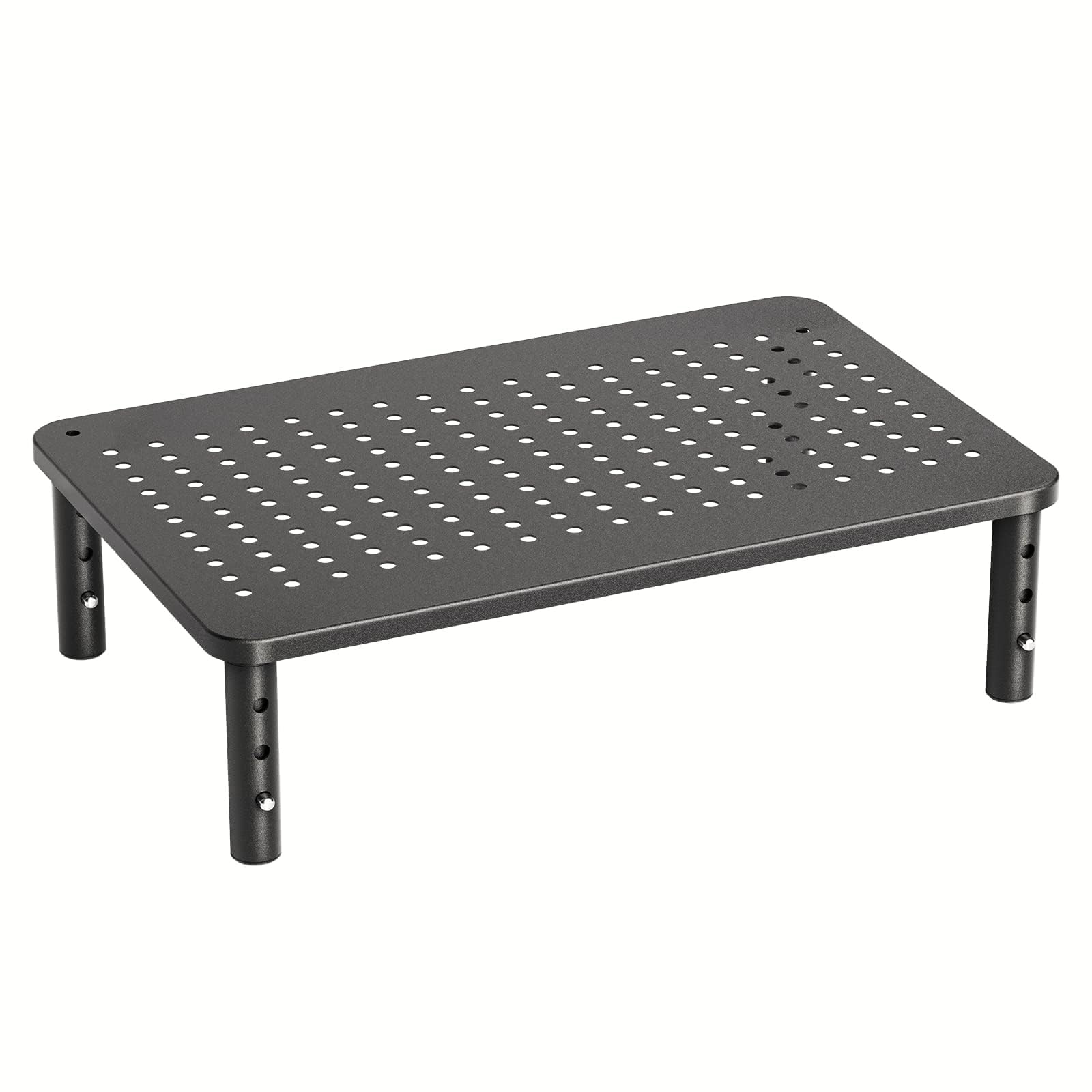
No tools and no VESA mounting — this is the easiest setup in the set for getting a laptop or single monitor off the desk surface. Three leg heights (3.94 to 5.51 inches) screw on by hand in about two minutes, and the powder-coated steel platform handles up to 44 lbs, covering laptops, one monitor, or a printer. The open, ventilated surface keeps airflow moving under the device during long work sessions.

Where the full-motion arm in this set earns its price with swivel and tilt, this riser trades articulation for instant placement. Once positioned it stays put, which suits a fixed desk arrangement and leaves day-to-day repositioning to the arm models. That simplicity is the whole pitch — no calibration, no tension dialing, no clamp.

This is the pick for budget classrooms, home offices, and anyone who wants simple elevation without mounting hardware. The 15.4 x 9.8-inch platform fits one laptop or monitor, not a multi-screen array, and at the tallest of its three heights heavier panels can feel unsteady — the mid and low settings hold weight best. For light-to-mid devices it delivers everything a taller, pricier stand does at a fraction of the cost.

Bottom line: For a laptop or single monitor on a fixed desk, this riser delivers 44 lbs of support at a lower price than any arm in the set. Buy it for simplicity; choose the full-motion arm if you will reposition your screen throughout the day.

#3

HUANUO FlowLift Dual

HUANUO FlowLift Dual

Dual monitors

Customer rating 4.6/5
Check Price

Worth Noting

  • Gas-spring tension tuning takes patience, and early adjustments can feel imprecise before settling
  • Panels near the 19.8-lb upper limit can wobble until tension is fully locked in
Desk Space
Frees surface
Mount Type
Clamping arm
Height Options
Gas spring
Install Effort
Screwdriver
Read the full review

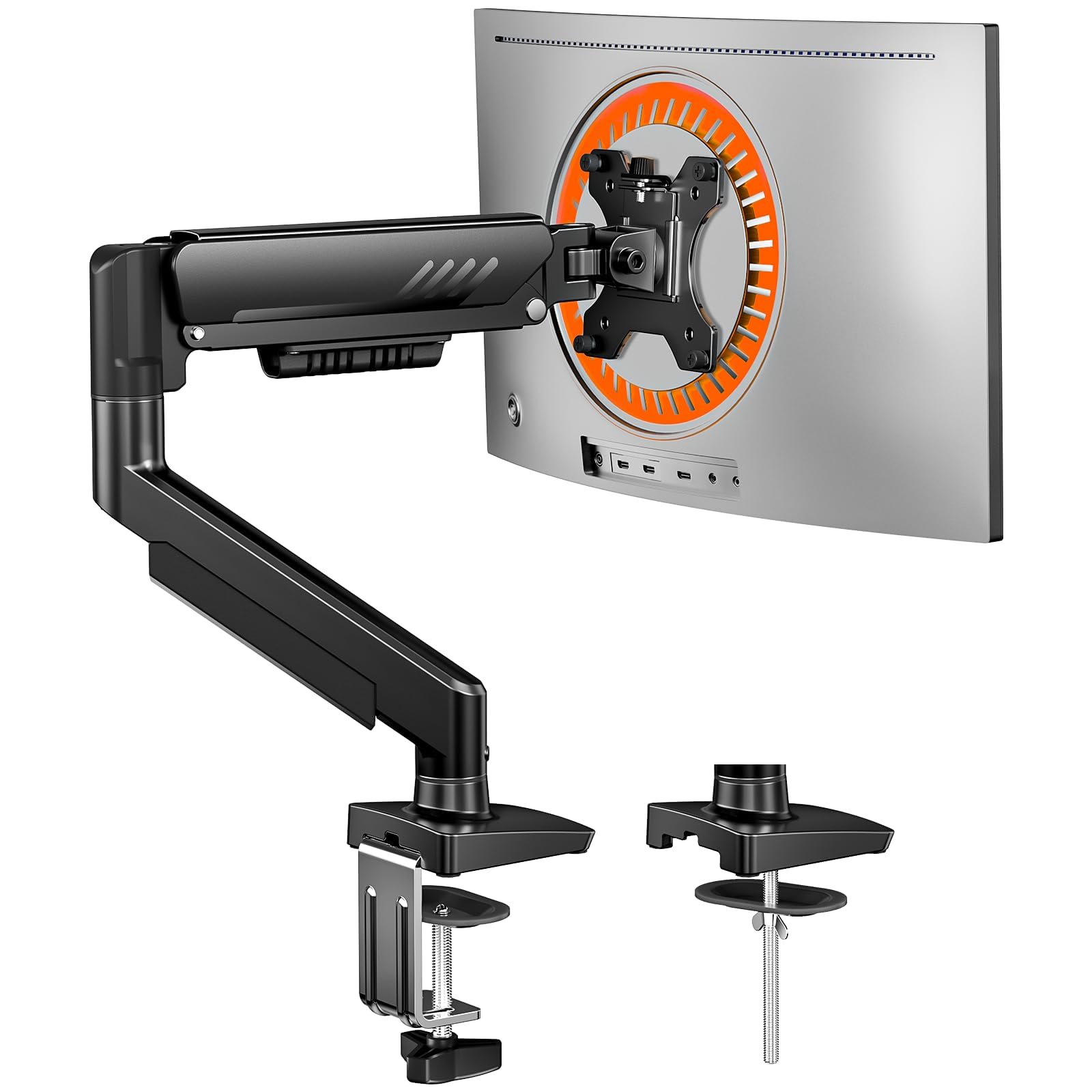
The FlowLift anchors with a C-clamp or grommet to the back edge of a solid wood desk, keeping the whole work surface clear where a free-standing base claims a footprint. Each arm rides a gas spring with 85 degrees of tilt, swivel, and rotate-to-portrait, and the two arms move independently rather than sharing one pivot.

Assembly with the included hardware takes around 15 minutes, and the arms hold paired 27-inch monitors without sag through a full workday. The independent motion does the real work: one screen can sit flat for drafting while the other tilts toward a secondary task, and once set, each arm holds its angle.

This suits coders, gamers, and multi-screen home offices that want both monitors lifted off the desktop and angled per task. The clamp needs a solid wood or laminate top for a secure bite, so glass or particleboard edges are out, and a single-screen minimalist will find the hardware overkill. Buyers running panels near the 19.8-lb upper limit should expect a tuning phase before the arms hold steady under load.

Bottom line: For dual-monitor coders and gamers with a solid wood desk, this clears the surface and angles each screen independently — a few minutes of tension tuning is the small price of the desk space it returns.

#4

Amazon Basics 3-Level

Amazon Basics 3-Level

Light monitors

Customer rating 4.6/5
Check Price

Worth Noting

  • Underside clearance tops out near 4.8 inches, so tall binders or a docking station won't fit beneath.
  • The 22-lb rating and compact top surface rule out heavy or oversized monitors.
Desk Space
Open underneath
Mount Type
Simple riser
Height Options
3 heights
Install Effort
Tool-free
Read the full review

Three tool-free heights — 2.87, 4.2, and 4.8 inches — stack and unstack in seconds, letting a laptop or light monitor sit at your chosen eye line without a screwdriver touching the stand. That three-level adjustability, paired with a non-skid ABS-plastic footprint, is what separates it from the single-height risers in this set; the shell feels solid rather than hollow, and the feet grip typical desk surfaces without shifting. It is the go-to height adjustment when you want portability instead of a permanent mounting arm.

Each level lifts apart and reassembles in moments, so moving between a home desk and a dorm or office takes under a minute with no tools and no loose parts. The low stack puts a laptop at a comfortable typing angle while the open underside keeps a keyboard or notebooks out of the way, and the whole unit lifts away cleanly when the desk needs clearing.

Students, telecommuters, and anyone running a second desk are the natural fit — places where a laptop or light monitor needs a modest lift without mounting hardware or a permanent footprint. The 22-lb ceiling and roughly 11-inch top surface mean heavy 24-inch panels and oversized ultrawides exceed this stand; weigh your monitor and measure its base before ordering.

Bottom line: A student or second-desk setup gets everything it needs from this riser — a steady lift, three quick heights, and a footprint that tucks into tight corners.

#5

OPNICE 2-Tier Stand

OPNICE 2-Tier Stand

Desk organization

Customer rating 4.7/5
Check Price

Worth Noting

  • The integrated drawer and pen holders lock the riser's layout
  • Pulling the drawer open while working takes a lean forward, since it sits low at the base of the riser.
Desk Space
Drawer + holders
Mount Type
Simple riser
Height Options
Fixed
Install Effort
Screwdriver
Read the full review

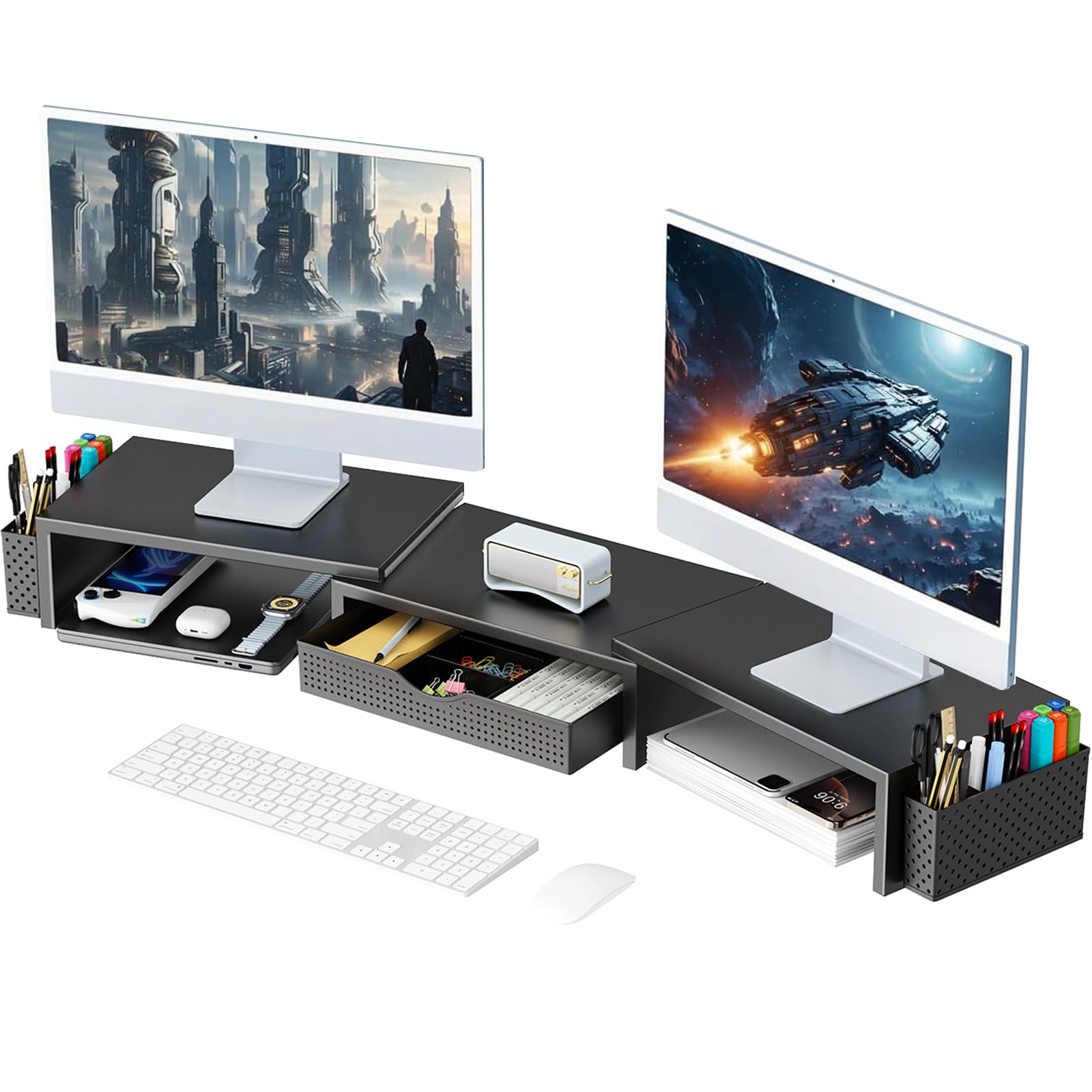
The powder-coated steel frame pairs a pull-out drawer with two hanging pen holders, turning this into a desk-ordering shelf as much as a monitor lift. Pens, sticky notes, and small supplies leave the keyboard deck and find a designated home — the point of this tier is storage before posture. The two-tier layout adds a lower shelf for a keyboard or paperwork while the monitor sits up top.

This OPNICE suits teachers sorting classroom materials and home-office workers whose desks accumulate odds and ends; in those rooms the drawer and side holders earn their keep. The structure is fixed — height locks at about 6.3 inches with no tilt or vertical adjustment — so buyers chasing ergonomic fine-tuning should look at the top pick's tilt range instead.

Rated to hold 44 pounds, it doubles as a laptop stand or a small printer shelf, and the powder coat won't mar the desk surface. Assembly is quick, with the frame and hardware going together in minutes. The 20.5-inch width fits a single standard display comfortably, with room left over for the organizer features, and the clean black profile blends into most office setups.

Bottom line: A tidy two-tier hub for desks where clutter, not posture, drives the purchase — teachers and office staff with scattered supplies will see the drawer do real work.

#6

ErGear EGDMA69B

ErGear EGDMA69B

Ultrawide monitors

Customer rating 4.4/5
Check Price

Worth Noting

  • Dialing in a precise height on heavier panels is finicky
  • On ultrawides near the 19.8-lb cap, the gas spring can drift from the set height.
Desk Space
Frees surface
Mount Type
Clamping arm
Height Options
Up to 17.5"
Install Effort
Tool-free
Read the full review

The ErGear EGDMA69B mounts in three tool-free steps and takes 27–34-inch panels in stride — a combination that's scarce at this price. Stability and gas-spring height hold are inconsistent on heavier or ultrawide panels, which is why it lands below the full-motion arms in this set. The 19.8-lb capacity and shallow clamp footprint suit desks where a bulky base crowds the surface. Ultrawide support is best viewed as a bonus; for standard 24–27-inch monitors it's a capable daily arm at a budget price.

Tighten every pivot before mounting — the arm holds firmly once all joints are snug.

Bottom line: For budget buyers on shallow desks running standard 24–27-inch monitors, this arm works well — keep the panel comfortably under the 19.8-lb ceiling.

#7

WESTREE Dual Riser

WESTREE Dual Riser

Wood-finish dual

Customer rating 4.6/5
Check Price

Worth Noting

  • Fixed 4.92-inch height leaves no room for ergonomic adjustment
  • On uneven floors, rocking can occur when the leveling pads aren't seated evenly
Desk Space
Open underneath
Mount Type
Simple riser
Height Options
Fixed 4.92"
Install Effort
Tools included
Read the full review

When the desk needs a handsome lift, the WESTREE Dual Riser pairs a rustic wood top with alloy steel legs, rated to hold 150 lbs across a 35.8-inch span — enough for two heavy monitors side by side. Assembly is quick with the included screwdriver, and the warm brown finish is exactly what décor-conscious home-office desks want. The catch is the fixed 4.92-inch height: buyers needing ergonomic adjustment should look at a gas-arm mount instead, a use-case mismatch rather than a flaw. On uneven floors, the stand can rock if the leveling pads aren't seated exactly, though realigning them settles it.

Seat both leveling pads evenly on a flat surface before loading — this keeps the stand steady.

Bottom line: Best for décor-focused home offices running two heavy monitors on a flat desk who don't need height adjustment — just seat the leveling pads evenly.

#8

VIVO STAND-V002F

VIVO STAND-V002F

No-clamp dual

Customer rating 4.4/5
Check Price

Worth Noting

  • Height adjustment along the pole is stiff; set it once and leave it
  • With arms fully extended, the lighter base can tip forward
Desk Space
None
Mount Type
VESA free-standing
Height Options
Pole adjustable
Install Effort
No extra tools
Read the full review

The VIVO dual arm carries the largest footprint among free-standing mounts in this set at 13 x 10.5 inches, and that wide base is what holds two 27-inch monitors with full tilt, swivel, and 360-degree rotation. Assembly needs no extra tools, and the all-metal construction gives a clean, professional look on a shared or home office desk.

The base's weight is the limiting factor. With the screens pushed forward, the rig can tip, so monitors need to sit within its center of gravity rather than hang off the edge — a set-and-forget arrangement where dual screens stay centered suits it well. Pole height adjustment is stiff too, so pick one position and keep it.

Position both screens close to the pole's center and keep the arms at short extension so the base holds firm.

Bottom line: For dual-monitor desks that can't take a clamp and where screens stay centered, this free-standing arm delivers a stable, clean setup — just keep the arms short.

#9

gianotter Dual Riser

gianotter Dual Riser

No-assembly dual

Customer rating 4.5/5
Check Price

Worth Noting

  • On a small desk, the wide footprint can crowd the workspace.
  • Magnetic pen holders can detach during daily use; the magnets hold at rest but not against a nudge.
Desk Space
Drawer + holders
Mount Type
Simple riser
Height Options
Fixed
Install Effort
No assembly
Read the full review

The gianotter arrives fully assembled, ready to hold two side-by-side monitors across a 40.6-inch span while a built-in drawer keeps cables and accessories tidy. The powder-coated metal top supports heavy dual panels with a stable, steady feel, and the wide surface suits large corners and generous cubicles.

Where it trails the competition: on a compact desk the wide footprint crowds the workspace, and the magnetic pen holders can detach with a nudge during daily use — treat them as removable accents, since the drawer and stable base carry the real value for a wide dual-monitor setup seeking instant placement.

Bottom line: Fits wide side-by-side dual-monitor desks that want instant, tool-free placement — as long as there is room for the span and the pen holders are best treated as removable accents.

How to Choose

Height Options

Fixed-height risers often add only 4 inches, which may not clear your eye line for ergonomic comfort. Adjustable stands let you match the height to your sitting posture, but they rely on gas springs or locking mechanisms that need tuning.

When a gas spring isn't tensioned correctly, the monitor drifts or sags over time. For taller users in a classroom or home office, a stand that reaches at least 15 inches gives the range needed to avoid chronic neck strain.

Mount Type

Risers are the simplest—they elevate whatever you place on them, but they offer no tilt, swivel, or portrait rotation. VESA free-standing mounts attach to the monitor's back and add adjustability, but they need a heavy base to prevent tipping when you move the arm.

Clamping arms free up the entire desk surface by anchoring to the edge, but they require a solid wood desk and can be a hassle to install. If you can't clamp, a free-standing mount with a wide, heavy base is the only option that won't tip.

Install Effort

Tool-free assembly is a plus, but many VESA mounts and clamping arms need a wrench or screwdriver. The hidden cost is time spent setting the tension correctly on gas-spring arms—get it wrong and the monitor won't hold its position.

If you're outfitting multiple desks (a classroom, a dorm), a riser that clicks together in two minutes beats an arm that takes an hour to tension. For a single permanent setup, the extra installation time is worth the desk-surface payoff.

Desk Space

Under-stand storage is a practical perk for teachers and office staff who need pens, sticky notes, and cables within reach. But risers with drawers add bulk and usually have a fixed height, so you trade ergonomic adjustability for organization.

Clamping arms eliminate the base entirely, reclaiming surface area for writing or a second monitor. The trade-off is no storage—if you need both, a mid-width riser with a drawer might be the better compromise.

Frequently Asked Questions