Classroom Supplies Product Guide

11 Best Document Camera for Teachers of 2026: Picks That Focus Fast

Which document cameras for teachers actually focus fast, connect to Chromebooks without fuss, and survive a full school year of daily use.

11 Best Document Camera for Teachers of 2026: Picks That Focus Fast editorial illustration

A document camera that hunts for focus mid-lesson breaks the flow of teaching — you pause, wait for the image to sharpen, and lose your class's attention. The cameras that hold up in real classrooms lock focus quickly, connect without driver gymnastics, and survive being packed and unpacked daily.

Resolution hype makes this harder than it needs to be. Several budget models advertise '4K' while delivering an 8MP sensor, and autofocus claims often outpace real-world behavior. What actually moves the needle is proven reliability: a camera that behaves the same way on day 90 as it does on day one, across Windows, Mac, and Chromebook.

This guide separates the cameras that earn their classroom spot from those that just look good on paper, so you can pick the one that matches how you actually teach — whether that's daily document close-ups or a portable rig you carry between rooms.

#1

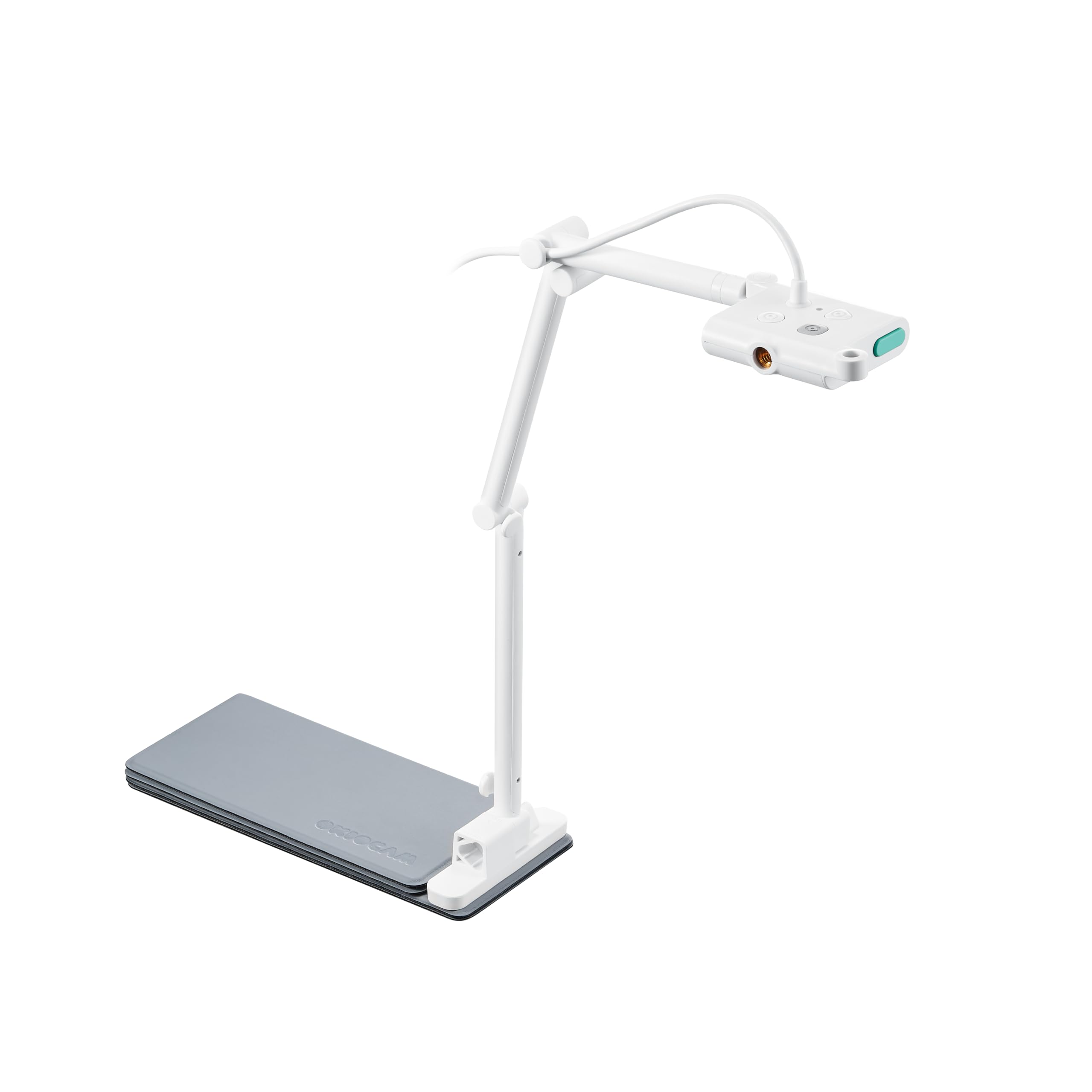
OKIOCAM S-4K

OKIOCAM S-4K

In-person and remote

Customer rating 4.5/5
Check Price

Worth Noting

  • Swivel travel is limited, so framing unusual angles may require repositioning the whole stand.
  • In dim classrooms the image can look slightly soft; adding a lamp sharpens output noticeably.
Autofocus
Autofocus
LED And Mic
—
Portability
Foldable design
Compatibility
Windows, Mac, Chromebook
Read the full review

The Sony Exmor R sensor reproduces printed worksheets, textbook diagrams, and handwritten notes in crisp 8MP detail, holding fine print sharp even when the camera is pushed to its maximum 3264×2448 capture. The OKIOPoint AI pointer circles or highlights individual sections live, so the whole class follows the same line of text instead of scanning the page independently. Streaming 1080p at 30fps keeps handwriting legible through live demonstrations in a way a built-in laptop webcam cannot manage, and the image holds up when papers are set at a slight tilt.

This connects over a single USB-C cable and registers as a plug-and-play camera on Windows, Mac, and Chromebook — no driver install and no configuration screen. Zoom and Google Meet recognize it on the first connection, and the autofocus tracks pages as they turn, so switching from a worksheet to a book illustration mid-lesson requires no pause to refocus. The foldable arm drops flat against the body when class ends, which cuts setup for the next period to a single plug-in.

Where the S-4K fits is as the daily driver for online and hybrid classrooms — set up in seconds, left on, and counted on through a semester of lessons without fuss. The swivel head covers standard overhead angles fine; the limits show up only for teachers who need extreme adjustability to capture unusual viewpoints, or who work in rooms where they cannot control the lighting. For that narrower group, a more flexible arm or a model with a brighter built-in light is the better fit, while the typical classroom teacher gets everything they need here.

Folded flat, the S-4K fits inside a laptop bag and moves between classrooms or between school and home without extra gear. At a mid-range price, it undercuts the premium-priced alternative in this set while matching everyday sharpness on worksheets and book pages, which matters for schools outfitting several rooms at once. The OKIOPoint software adds annotation tools that let a teacher mark up the live image, turning the camera into more than a passive viewer.

The chassis feels dense and sturdy for the price, with a firm hinge that holds its position instead of sagging mid-lesson. That solidity — plus a fold mechanism that stays tight — is why the S-4K holds up under the daily open-and-close routine a traveling teacher puts it through.

Angle the arm straight down over the page for the most stable framing during live lessons.

Bottom line: For teachers building an online or hybrid classroom on a budget, the S-4K is the camera to reach for — plug in, point, and teach.

#2

IPEVO V4K

IPEVO V4K

Fine-print detail

Customer rating 4.5/5
Check Price

Worth Noting

  • The swivel LED takes a few tries to aim, leaving shiny stock unevenly lit in bright rooms
  • Older or non-standard computers may not recognize the camera, so pairing expects a current system
Autofocus
Autofocus
LED And Mic
Adjustable LED
Portability
Multi-joint arm
Compatibility
Mac, Windows, Chromebook
Read the full review

The V4K pairs an 8MP Sony CMOS sensor with a multi-jointed arm that stays put, so fine print and intricate diagrams remain legible at 3264×2448 capture. Where the top pick leads on everyday consistency, this model's edge is resolving small type and dense detail — a genuine gain for worksheets, manuscripts, and scientific charts that lose definition on lower-resolution sensors. The arm holds its angle even while you adjust the head, a steadiness the foldable webcam hybrid from the same brand can't match.

Color stays faithful to the original page under both daylight and room lighting, and Full HD output at 30fps keeps panning smooth for students watching live. The compact build suits teachers who split time between a home desk and a classroom, carrying the same capture quality to both spots without an extra rig.

This fits teachers who spend minutes per page — dissecting a poem, annotating a worksheet, or walking through a complex diagram — where each page earns extended screen time. Its autofocus can slow on laminated or coated covers and may hunt before locking, so rapid page-flip sessions run smoother on the top pick.

Bottom line: The V4K fills the fine-detail role in this set — teachers who annotate worksheets, manuscripts, and diagrams get the crispest close-up capture.

#3

INSWAN INS-1

INSWAN INS-1

Annotation tools

Customer rating 4.6/5
Check Price

Worth Noting

  • Budget-only classrooms pay more than on no-frills entry cameras that skip the software extras.
  • In low-light rooms, autofocus can occasionally take a beat to lock the sharp image.
Autofocus
Autofocus
LED And Mic
LED, built-in mic
Portability
Compact design
Compatibility
Windows, Mac, Chromebook
Read the full review

The INS-1 pairs an 8MP Sony CMOS sensor with Documate annotation software, so zooming into a worksheet or circling a diagram mid-lesson is part of the flow rather than a reason to switch apps. Setup is plug-and-play across Windows, Mac, and Chromebook, and the built-in LED and mic handle the essentials without extra gear. Image output stays sharp for handwriting, textbook pages, and printed worksheets.

During live sessions, Documate's annotation layer keeps students following along as you highlight equations and mark up pages in real time. The 30fps output stays fluid on shared screens, and the compact footprint leaves room for the paper stack beside it. For classrooms rotating between physical and digital teaching, the bundled tools remove the friction of juggling a second app.

This camera suits teachers who want annotation and zoom built into the workflow without the premium of the workhorse top pick, and who value bundled software over raw resolution — anyone needing 4K or extra-large capture should look at the higher-end option from the same brand. The honest tradeoff is the autofocus: in low-light rooms it can occasionally lag, so well-lit setups get the smoothest live lessons. Budget-only classrooms will find cheaper entry models, but they give up the software layer that makes live sessions click.

A small desk lamp near the document area helps the autofocus lock fastest, especially for faster-paced lessons.

Bottom line: The right pick for teachers who want annotation and zoom built in without the premium of the workhorse option. Keep the work area well lit and it carries live lessons with confidence.

#4

THUSTAR 8MP

THUSTAR 8MP

Budget classroom use

Customer rating 4.3/5
Check Price

Worth Noting

  • Brightness steps through only three preset levels, leaving no fine control in mixed lighting.
  • In a dim classroom the built-in LED may not fully cover a page
Autofocus
Autofocus
LED And Mic
3-level LED, dual mics
Portability
—
Compatibility
Windows, Mac, Chromebook
Read the full review

At a budget-friendly price, THUSTAR delivers genuine 8MP capture (3264 x 2448) at 30fps with a 3-level LED and dual microphones, a combination entry models rarely match. Setup is plug-and-play across Windows, Mac, and Chromebook, and autofocus settles onto documents without hunting. That makes it the value pick against the OKIOCAM in this set: comparable everyday output, no software extras, and a substantially lower price.

Build quality punches above the asking price, with the chassis holding up through a semester of daily classroom handling. Image clarity stays sharp for worksheets, textbooks, and student work shown on a projector, and the 30fps frame rate keeps live demonstrations fluid. Dual microphones carry a teacher's voice clearly for recorded lessons, saving the cost of a separate mic.

This suits budget-conscious teachers and instructors building a home-teaching station without a large outlay. The modest built-in light suits standard classroom lighting, a fair trade at this price point. Teachers who lean on annotation tools or broadcast-grade output will find the OKIOCAM in this set the better match.

Flipping the arm doubles the unit as a webcam for video calls, so online lessons and document display share one device. Bundled software stays simple — no annotation layer — which only matters if you plan to mark up images live during class; the top pick in this set already serves that workflow.

Keep a small desk lamp near the work surface to lift output in naturally dim rooms.

Bottom line: The THUSTAR 8MP gives budget-focused teachers solid everyday document display with three extras — 8MP capture, a 3-level LED, and dual mics — that entry peers skip. Choose it for daily teaching value; step up to the OKIOCAM in this set only when annotation software is essential.

#5

kitchbai 4K

kitchbai 4K

Everyday all-rounder

Customer rating 4.5/5
Check Price

Worth Noting

  • '4K' label oversells a true 8MP sensor
  • Zoom controls demand extra button presses to fine-tune magnification, which can stall a live lesson.
Autofocus
Autofocus
LED And Mic
3-level LED, dual mics
Portability
Foldable design
Compatibility
Windows, Mac, Chromebook
Read the full review

The kitchbai pairs sharp 8MP output with accurate colors in a foldable build, priced below comparable mid-range document cameras. Autofocus locks onto worksheets and textbook pages without the hunting that plagues budget units, and the three-level LED keeps standard print readable in dim classrooms. It delivers dependable image quality for teachers who don't need the annotation suite of the value leader or the AI pointer of the top pick — and it does so at a price below the category average.

This is the camera for teachers who want a set-and-forget daily driver for worksheets, homework spot-checks, and read-alouds. The '4K' branding oversells an 8MP sensor, so fine print tops out at 8MP detail — a minor gap for standard classroom materials. It connects across Windows, Mac, and Chromebook, stores flat between periods, and needs no driver install to get going. Just don't build a lesson around smooth zooming, since the controls add steps when you're framing tight text.

The dual mics capture a teacher's voice cleanly on recorded lessons, and the three-level LED keeps standard documents readable even when overhead lighting is uneven. At 30fps, handwriting and moving manipulatives stay smooth on screen, so a felt-tip demonstration of a math problem or a science experiment remains legible without stutter. That frame rate also keeps page turns fluid when you switch between a book and a worksheet mid-lesson.

Bottom line: Budget-minded teachers who frame standard documents at arm's reach get solid value here; the button-driven zoom only becomes a factor when your lessons hinge on tight fine-print framing.

#6

INSWAN INS-2

INSWAN INS-2

Art, maps, posters

Customer rating 4.4/5
Check Price

Worth Noting

  • Zoom close-ups can trigger a refocus on the wrong object, so fine-print shots need a steady hand
  • Built-in LED tops out dim, leaving darker classrooms dependent on added lamp light for even images
Autofocus
Autofocus
LED And Mic
LED, built-in mic
Portability
—
Compatibility
Mac, Windows, Chromebook, iPad
Read the full review

The INSWAN INS-2 stakes its case on capture size: a 13MP Sony CMOS sensor streams 4K at 30fps across an A3-width area, bringing posters, maps, and two-page spreads into view at a resolution most 8MP classroom cameras crop away. That large-format fidelity is the real differentiator, steering this model toward art and design teaching where material detail matters more than rapid page swapping. Alongside the value-focused INS-1 in the same brand, this one wins on raw image real estate rather than software extras.

Art teachers with well-lit rooms get the most from the wide capture field and detailed output, with canvas textures, ink strokes, and poster artwork coming through clearly for close-up demonstration. The tradeoff shows in dim spaces: autofocus can slow its lock in low light, so teachers who move quickly between glossy pages in a dark room will want extra lighting planned in. In a bright studio the same sessions run smoothly with little fuss.

Setup stays simple, with connect-and-install software that gets the camera live in time for class. The built-in microphone records lesson audio well enough to skip an external mic for most rooms, and the mid-range price undercuts dedicated 13MP options while holding onto the detail level art demos depend on. It serves as this lineup's high-resolution large-format pick rather than a jack-of-all-trades daily driver.

Angle glossy pages slightly and keep the shot evenly lit to get clean close-ups on the first try.

Bottom line: Art and design teachers who regularly show posters, maps, and two-page spreads get large-format detail most document cameras can't reach.

#7

IPEVO DO-CAM

IPEVO DO-CAM

On-the-go portability

Customer rating 4.5/5
Check Price

Worth Noting

  • In a fast-paced lesson with quick document changes, the manual focus requires adjustment that can interrupt the flow.
Autofocus
Manual focus
LED And Mic
—
Portability
0.74 lbs webcam flip
Compatibility
Mac, Windows, Chromebook
Read the full review

At 0.74 lbs, the DO-CAM is the lightest camera here, and its flip hinge converts it to a webcam that connects to Zoom, iMovie, and Google Meet — a genuine two-for-one for traveling educators. Picture quality is sharp and the build feels solid. The tradeoff is focus: manual adjustment is required when swapping between documents, so fast-paced lessons where materials change every few seconds will feel slower. That slowdown suits teachers who present from a static worksheet or lead discussion-style classes, where the focus stays locked once set.

Bottom line: Best for traveling educators who lead discussion-style classes from a set worksheet — the flip webcam replaces a second device on the road. Presenters who swap documents every few seconds are better served by an autofocus model.

#8

PAKOTOO 8MP

PAKOTOO 8MP

Low-cost temporary use

Customer rating 4.3/5
Check Price

Worth Noting

  • Autofocus can hesitate on glossy pages or fine print, slowing quick document swaps mid-lesson.
  • On certain laptops, the camera may not always show up in the connected-device list.
Autofocus
Autofocus
LED And Mic
3-level LED, dual mics
Portability
Adjustable arm
Compatibility
Windows, Mac, Chromebook
Read the full review

The PAKOTOO 8MP sits at an entry-level price while still delivering sharp 8MP output. Setup is plug-and-play, feeding into Zoom or Google Meet within minutes, and the sensor keeps printed worksheets readable for remote students. The 3-level LED brings small text up clearly even in dim rooms.

The bigger caveat is durability: some units may become unresponsive after a few weeks of daily classroom rotation, and that risk is what keeps this out of daily-driver territory. As a stopgap or backup camera it delivers; as a year-round workhorse, the more durable options in this set hold up better over the long haul.

Bottom line: Best as a backup camera or short-term budget solution when a classroom needs a low-cost display up fast.

#9

THUSTAND

THUSTAND

Manual-focus control

Customer rating 4.2/5
Check Price

Worth Noting

  • Some systems may not register the camera on first plug-in, requiring a reconnect before display works
  • At high zoom, fine print and tightly packed diagrams appear soft against 5MP capture
Autofocus
Manual and autofocus
LED And Mic
3-level LED
Portability
—
Compatibility
Windows, Mac, Chromebook
Read the full review

The manual focus ring locks a fixed distance, so teachers who tire of autofocus hunting can swap worksheets without the camera re-adjusting mid-lesson. Build quality and image clarity earn steady praise, and a 3-level LED with 5-level exposure control helps tame dim classroom lighting.

Resolution tops out at 5MP, which keeps normal print and diagrams crisp but softens fine-print pages at high zoom. Occasional connection hiccups with certain systems surface on first plug-in, though the camera registers without issue on typical setups.

Bottom line: Best for teachers who value steady manual focus over megapixels and work with normal-size worksheets. Not the pick when a lesson hinges on fine-print pages shown at high zoom.

#10

AlKOR

AlKOR

Entry-level basic use

Customer rating 4.3/5
Check Price

Worth Noting

  • 1080p capture softens fine print and dense diagrams, limiting small-text use
Autofocus
Manual focus
LED And Mic
Built-in mic
Portability
Foldable design
Compatibility
Windows, Mac, Chromebook
Read the full review

The most affordable route to live document display — plug into any laptop, turn the focus ring, and worksheets appear with no software to install. Windows, Mac, and Chromebook connect without drivers; the foldable arm and built-in mic cover everyday online teaching. For teachers showing whole pages at a steady distance, the clean 1080p image handles the core job.

The honest ceiling is sharpness — fine print and dense diagrams soften at 1080p, so small annotations will strain readers. Teachers who keep documents at one working distance won't hit these limits; those zooming into tiny text should step up to a sharper sensor.

Set the focus ring for your teaching distance and keep documents in that range to avoid refocusing between items.

Bottom line: For teachers who display whole worksheets, book pages, and classroom objects at a steady distance, this is the most budget-friendly working option. Those who zoom into tiny print will get more from a higher-resolution sensor.

#11

PAKOTOO 5MP

PAKOTOO 5MP

Doc and webcam

Customer rating 4.2/5
Check Price

Worth Noting

  • In lessons projecting dense textbook pages, 5MP detail can look soft for fine print and detailed diagrams.
Autofocus
Autofocus
LED And Mic
3-level LED
Portability
Adjustable arm
Compatibility
Windows, Mac, Chromebook
Read the full review

At a budget-friendly price, the PAKOTOO 5MP covers both document display and webcam duty; its 3-level LED and 5-level exposure control keep textbook pages legible in dim classrooms, and the adjustable arm holds a range of viewing angles across Windows, Mac, and Chromebook setups. Where it trails higher-ranked picks is resolution: at 5MP, very fine print and dense diagram labels can look slightly soft, while same-price 8MP rivals render text more crisply. That boundary suits teachers who move between worksheets, objects, and video calls rather than those projecting fine-grained schematics.

Bottom line: For teachers who want one budget device handling both document display and video calls with standard classroom materials, the PAKOTOO 5MP delivers.

How to Choose

Sensor Resolution

An 8MP sensor captures a 3264×2448 image — enough to zoom into small print, map legends, and fine lines during a live lesson. A 5MP sensor (2592×1944) handles full pages fine but turns soft on tiny captions or dense diagrams.

Treat '4K' labels on budget models with suspicion. Several advertise 4K while delivering an 8MP sensor with upscaled output — the resolution is genuine, but it isn't the 3840×2160 you might assume. Check the sensor spec, not the box.

Autofocus Behavior

Autofocus hunts when the frame lacks contrast — glossy paper, a dim desk, or a quick swap from page to page. The classic trigger is a flat, low-contrast document like a photocopied worksheet, and in a live lesson that pause while the image locks can stall your momentum.

Manual-focus models give you the fix for frequent document changes: set the focus distance once, and every sheet you slide underneath is already sharp. If your lessons mix pages with 3D objects, weigh autofocus speed over the spec sheet's numbers.

Device Compatibility

Most document cameras are UVC-compliant — they plug in over USB and register as a webcam, no drivers needed on Windows or Mac. That's why they work out of the box with Zoom, Google Meet, and Teams.

Chromebooks are the gap. Some models lean on proprietary software or bundled apps that Chrome OS can't load, leaving you with a camera the system won't recognize. If your school issues Chromebooks, confirm the exact model lists Chrome OS support before you buy.

LED and Microphone

A 3-level LED gives you control in dim rooms, but not all lights are equal — some are fixed and can't be angled, so they wash out glossy pages or cast shadows on textured paper. In a windowless classroom, an adjustable, brighter light matters more than sensor resolution.

For online lessons, a built-in microphone saves you from plugging in a separate USB mic. It won't rival a dedicated microphone, but it's plenty for a class discussion.

Portability and Design

Foldable models collapse flat and slip into a bag, which matters when you carry your rig between rooms or between home and school. The trade-off: a multi-joint arm holds its position more reliably for static documents, while a folding hinge can loosen over months of use.

If you move constantly, weight decides whether the camera stays in your bag or your closet — some ultra-light models hit just 0.74 lbs.

Frequently Asked Questions