Student Tech Product Guide

7 Best Coding Toys of 2026: That Actually Teach Code

Coding toys for 8-year-olds that genuinely teach programming, with advice on avoiding app-dependent bricks.

7 Best Coding Toys of 2026: That Actually Teach Code editorial illustration

Shopping for a coding toy for an 8-year-old is harder than it looks. Many kits advertised as 'programmable' turn out to be little more than remote-controlled vehicles with a STEM sticker, and a growing number rely on companion apps that can stop working without warning. The trick is separating genuine programming lessons from the buzzwords.

Real coding toys for this age do exist — ones that teach sequencing, loops, and variables through play. They range from build-it-yourself robots to ready-to-play balls, each with a different trade-off between price, durability, and learning depth. Piece counts matter less than whether the toy survives daily use without a dead battery or a dead app.

Age claims are also loose. A kit labeled '8–14' may require more patience than many 8-year-olds have, while another designed for younger kids could feel babyish. Matching the toy to the child's actual temperament is what turns it from a one-time plaything into a lasting learning tool.

#1

Wonder Workshop Dash
Wonder Workshop Dash

Coding fundamentals

Customer rating 4.6/5
Check Price

Worth Noting

  • The initial setup can be fiddly for families new to robotics
  • In some cases the companion apps run sluggish on certain phones, and an occasional voice command may not register.
Age Fit
6-11
Build Type
Ready to play
Coding Depth
Blocks, loops, variables
Read the full review

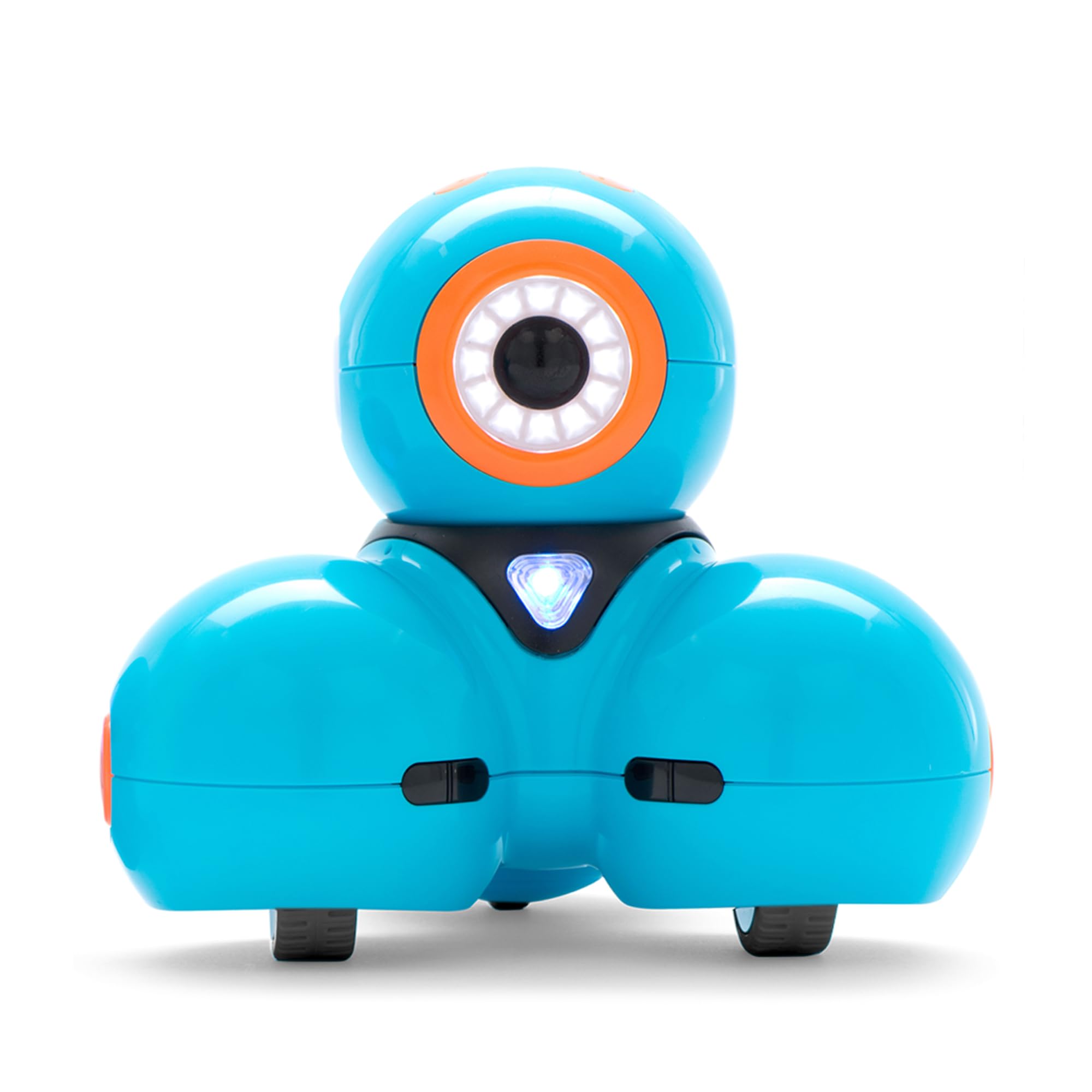
Dash's classroom-validated pedigree shows in how it teaches. The Blockly and Wonder apps walk kids through loops, variables, and algorithms step-by-step rather than burying them in menus, and the robot responds to each block immediately, so the cause-and-effect of coding clicks fast for a 6-11 year old. Sequencing comes naturally because every incorrect command produces instant, visible feedback instead of an abstract error.

Kids form a genuine attachment to this robot — its playful voice and animated eyes make it feel like a companion more than a lesson. Battery life covers sustained play-and-code sessions on a single charge, and voice-command controls let younger siblings join in while older kids focus on writing actual programs. The five apps offer different difficulty levels, so the toy grows with the child rather than being outgrown.

This robot is for families committed to real coding fundamentals at home, applying the same curriculum used in 40,000+ classrooms worldwide. The premium price tag is the genuine tradeoff — it runs roughly three times the cost of a pocket-sized coding ball — a hurdle for budget-conscious households. Kids who mainly want remote-control-style play will not find that here.

Bottom line: Dash turns a 6-11 year old's playtime into real programming practice, with a robot kids genuinely enjoy coding with.

#2

Sphero Mini

Sphero Mini

Budget coding

Customer rating 4.6/5
Check Price

Worth Noting

  • App connection can drop when the ball is just a few feet from the phone
Age Fit
8+
Build Type
Ready to play
Coding Depth
Blocks + JavaScript
Read the full review

Pocket-sized at 1.57 inches, the Sphero Mini folds genuine block-based, draw-to-code, and JavaScript programming into a budget-priced, ready-to-play ball — a lighter, cheaper alternative to the school-honored Dash that anchors the premium end of this set. Coding is real here: the Play and Edu apps let an 8-year-old stack drag-and-drop blocks or write actual JavaScript, not just steer a remote toy.

This suits parents who want an affordable entry point into real programming without the Dash's higher price. Playful driving and mini-games keep interest up between coding sessions. The thin plastic shell favors careful, tabletop-style play, so it's less suited to rough-floor handling or kids who drop their toys — a boundary worth knowing before checkout, not a reason to skip it.

Keep the ball within a few feet of the phone or tablet when coding — the connection holds best at close range.

Bottom line: For an 8-year-old's first taste of real programming on a budget, the Sphero Mini blends genuine block and JavaScript lessons with playful driving in a pocket-sized ball — the sensible gateway before investing in the full Dash setup.

#3

Makeblock mBot

Makeblock mBot

Build and code

Customer rating 4.6/5
Check Price

Worth Noting

  • Entry-level Scratch coding
Age Fit
8-12
Build Type
Build yourself
Coding Depth
Scratch-style blocks
Read the full review

The mBot is the build-it-yourself member of this set, and that constructing is the real lesson. A 15-minute assembly walks an 8-year-old through wiring and a metal chassis before any code runs; Scratch-style block coding then takes over through the coding cards, on an open-source platform with 100+ add-on packs.

This suits kids who love tinkering over instant play — families building together get the most from it. Kids who want a ready-to-play robot out of the box fit the top pick better. Bluetooth can be unreliable, so some sessions may need a USB tether to keep the robot responding.

Move to the 100+ add-on sensor packs to stretch the Scratch lessons once the starter projects are done.

Bottom line: For families who want building to be part of the lesson, the mBot delivers hands-on electronics and coding fundamentals at a mid-range price.

#4

Sillbird 488

Sillbird 488

Block building

Customer rating 4.6/5
Check Price

Worth Noting

  • Remote pairing can be inconsistent on some units, requiring a fresh re-sync
  • App or remote connection can fail to establish on some units
Age Fit
6-12
Build Type
Build yourself
Coding Depth
App control
Read the full review

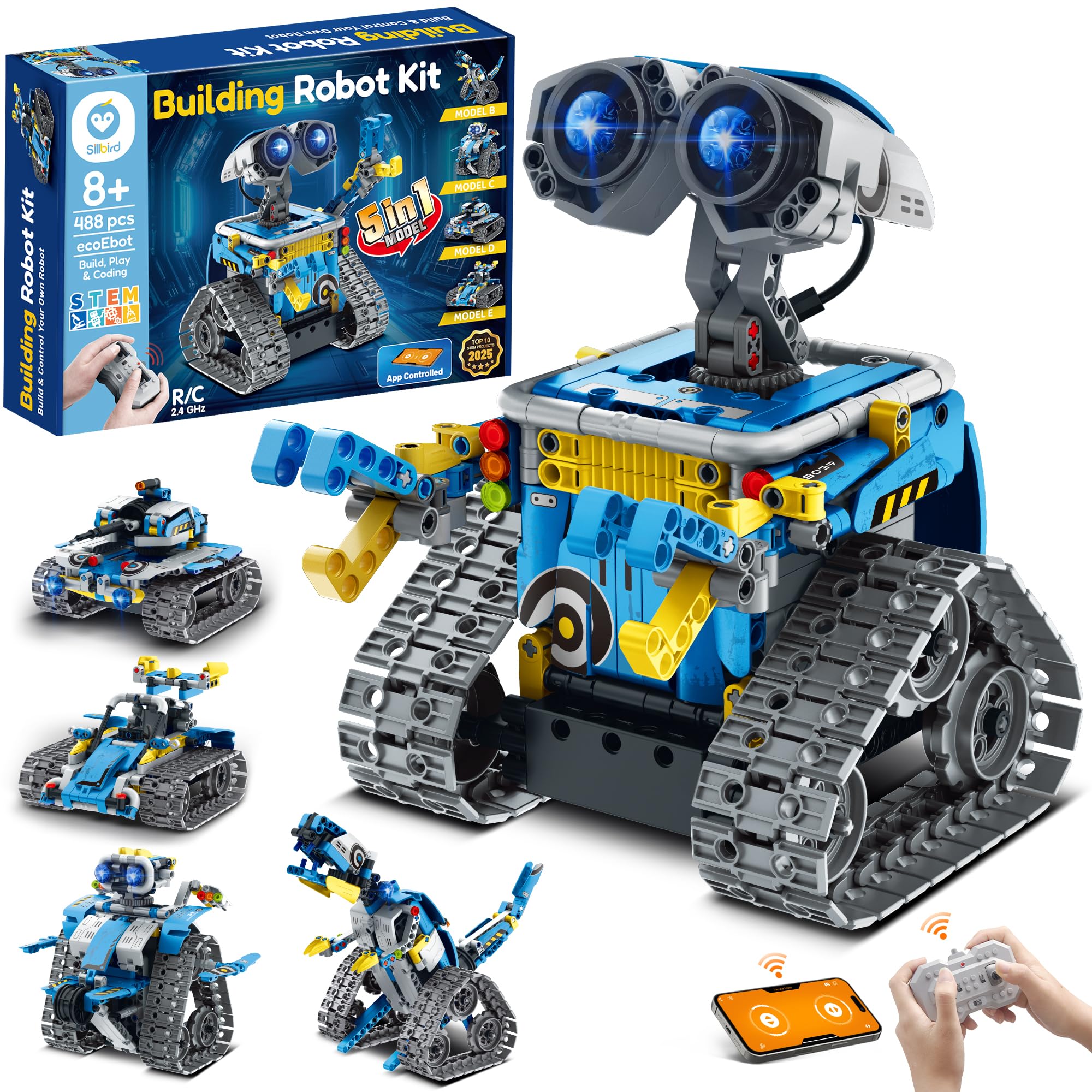
This 488-piece kit rebuilds into five models — robot, car, tank, and dinosaur — pairing block assembly with both app and remote control, so the build teaches wiring and Scratch-style logic before the driving begins. The higher-piece sibling in this line pushes a steeper challenge; this one keeps assembly approachable while still offering dual control.

Best for LEGO-style builders aged 8 and up who enjoy assembly as much as the finished bot — these kids return to it daily. Some steps run fiddly for younger hands, and since app and remote are part of the play, an adult for the pairing session helps.

Pair the remote and open the app before a play session — connection setup goes smoothest in short, patient steps.

Bottom line: Right for an 8-year-old who loves building as much as coding — substantial, affordable, and worth the pairing patience for construction-first play.

#5

LEGO Boost 17101

LEGO Boost 17101

LEGO builders

Customer rating 4.7/5
Check Price

Worth Noting

  • No printed manual
Age Fit
7-12
Build Type
Build yourself
Coding Depth
App-based coding
Read the full review

The 847 pieces rebuild into five app-coded models — a deep build-and-code hybrid for LEGO-obsessed kids 7-12, with block programming that teaches real logic. Rebuilding extends engagement for months. But at close to double its usual street price the deal is weak today, and the app can behave inconsistently on some setups.

Bottom line: Buy only for a LEGO-obsessed 7-12-year-old once the price returns to its typical street value — at today's near-double cost, the kit is a poor deal.

#6

Henoda 468

Henoda 468

Budget intro

Customer rating 4.5/5
Check Price

Worth Noting

  • App-driven modes like path and voice can frustrate when connectivity drops, souring a first robotics experience
Age Fit
8-16
Build Type
Build yourself
Coding Depth
App control modes
Read the full review

The Henoda 468 packs five control modes at the lowest price in this set, and its design genuinely excites kids while keeping an 8-year-old busy for long stretches. But the pieces connect stiffly and app reliability is hit-or-miss, so treat it as a budget trial of interest rather than a polished learning tool.

Bottom line: Best as a low-budget first robot for an 8-year-old already hooked on building-blocks who won't mind the stiff pieces — a sensible trial run before committing to a pricier kit.

#7

Sillbird 596

Sillbird 596

Experienced builders

Customer rating 4.7/5
Check Price

Worth Noting

  • For a younger first-time builder, the 596-piece assembly demands patience; an experienced tinkerer moves through it smoothly.
Age Fit
8-14
Build Type
Build yourself
Coding Depth
App control
Read the full review

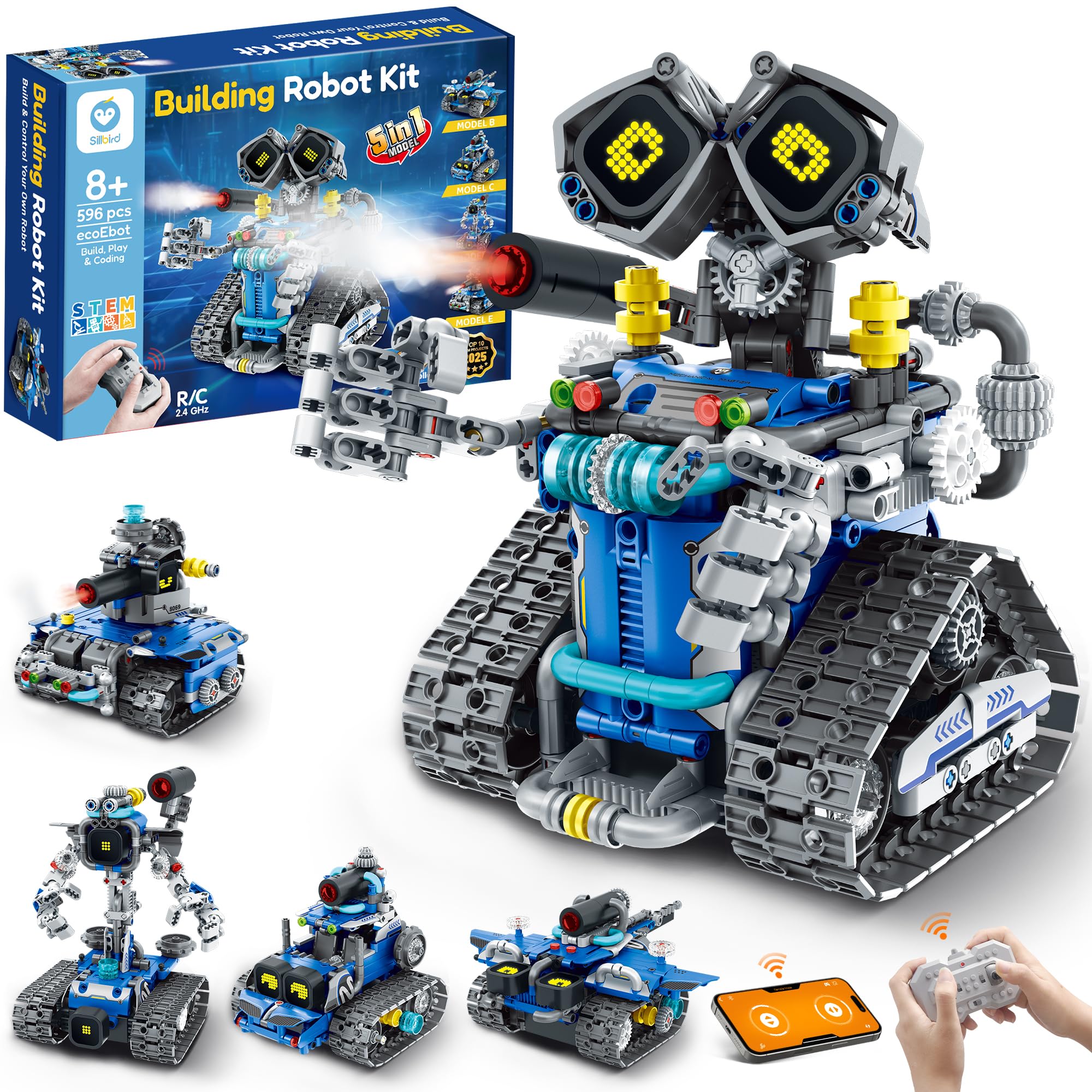
The 596-piece Sillbird stretches the 5-in-1 concept with LED eyes, sound effects, and a mist-spray, plus a far more demanding assembly than the slimmer 488-piece sibling. That higher difficulty is the tradeoff — it rewards patient, experienced tinkerers around 10+ but overwhelms first-time builders, so it fits kids who enjoy a real project rather than a plug-and-play toy.

Bottom line: Best for older kids around 10+ who want a longer build and extra features and already have some experience with block assembly.

How to Choose

Coding Depth

The label 'programmable' says nothing about how much real code your 8-year-old will write. Some kits offer draw-and-drop blocks that teach sequencing and loops, while others pair a remote control with a phone app and call it coding.

The trade-off is that deeper coding languages like JavaScript or Scratch require more screen time and patience, but they build actual programming logic. A toy that only moves with a joystick isn't teaching code — it's a remote-control car with a STEM label.

Build or Ready-to-Play

Ready-to-play robots like Dash or Sphero work right out of the box, which means an 8-year-old can start coding within minutes. Build-it-yourself kits like mBot teach electronics and engineering alongside coding, but they require assembly time and patience.

The hidden cost of building is that some kits are far more fiddly than others. An 8-year-old may need significant help, and if the pieces don't connect cleanly, the frustration can kill interest.

App and Connection Reliability

Every robot in this category relies on a companion app, and that app is a single point of failure. If the manufacturer stops updating it — or discontinues it entirely — the toy becomes useless, as happened to one well-known kit in this roundup.

Bluetooth reliability is also a factor. Some robots drop connection a few feet away, and others require the app to stay open. Check recent reviews for connection complaints before you commit.

Age-Fit Accuracy

Age ranges on the box are marketing, not a measured standard. A set labeled '8-14' may demand more fine-motor skill than most 8-year-olds have, while another aimed at '6+' might feel babyish.

Look at the actual activities: does it require patience to assemble? Is the coding interface readable by a second-grader? Choose based on the child's specific temperament, not the claimed age span.

Rebuild Value

The best building kits offer multiple models from the same piece set, which extends playtime and lets a child experiment. LEGO Boost and some Sillbird kits allow you to rebuild the robot into different forms.

The trade-off is that more pieces usually means more complexity and higher cost. A 500-piece kit with 5 models is great for a dedicated builder, but a simpler 200-piece set might suit a child who'll lose interest quickly.

Frequently Asked Questions